
Download PentaZip – File Compression, Decompression, SFX Creation, Secure Archive Management
Overview
PentaZip is a versatile mobile utility designed to simplify file compression and decompression tasks across multiple formats. As a comprehensive tool, it enables users to manage archived data efficiently, whether for personal organization or professional workflows. The app supports a wide range of archive types, including ACE, RAR, and GZip, ensuring compatibility with most compressed files encountered in daily digital interactions. Its core purpose lies in streamlining file handling by consolidating essential archive functions into a single, accessible platform.
Target users include individuals who frequently exchange or store compressed files, as well as professionals managing large volumes of digital documents, media, and project assets. The ability to create self-extracting files and preview content without full extraction enhances usability, particularly for users who need quick access to file contents without additional software. While the developer did not provide additional technical details, PentaZip has been recognized for its integration with Windows environments, suggesting a focus on cross-platform functionality and user convenience.
Real-world applications include sharing large project folders via email, organizing backup files, and securing sensitive data through password protection. In the broader app ecosystem, PentaZip fills a critical gap for users seeking a reliable, all-in-one compression solution without relying on multiple third-party tools. Its long-standing presence since 2003 underscores its reliability and continued relevance in digital file management.
Key Features & Functionality
PentaZip delivers a robust set of tools tailored for efficient file management. The app supports a broad spectrum of archive formats, including ACE, RAR, GZip, and others, allowing users to open, extract, and manage files regardless of their compression type. This extensive compatibility ensures that users are not limited by file format restrictions, which is especially beneficial in collaborative environments where file sources vary.
- Multiple Format Support: Seamlessly handles ACE, RAR, GZip, and other common archive types, reducing dependency on multiple tools.
- Self-Extracting File (SFX) Creation: Allows users to generate SFX files that can be run independently, enabling recipients to extract content without needing PentaZip or other software.
- Preview Functionality: Users can view file contents in compatible formats—such as MP3 audio, DOC documents, and JPEG images—without full extraction, saving time and storage.
- Data Security and Protection: Offers password protection for archives, helping safeguard sensitive information from unauthorized access.
- Multiple Document Interface (MDI): Supports simultaneous handling of multiple archives, improving workflow efficiency and productivity.
For example, a remote worker can compress a project folder into a secure RAR archive, add a password, and generate a self-extracting file for a client who lacks compression software. Similarly, a student can preview a compressed PDF or image collection before deciding which files to extract. These features collectively enhance usability, reduce friction, and support both casual and advanced users in managing digital files effectively.
Interface, UX & Performance
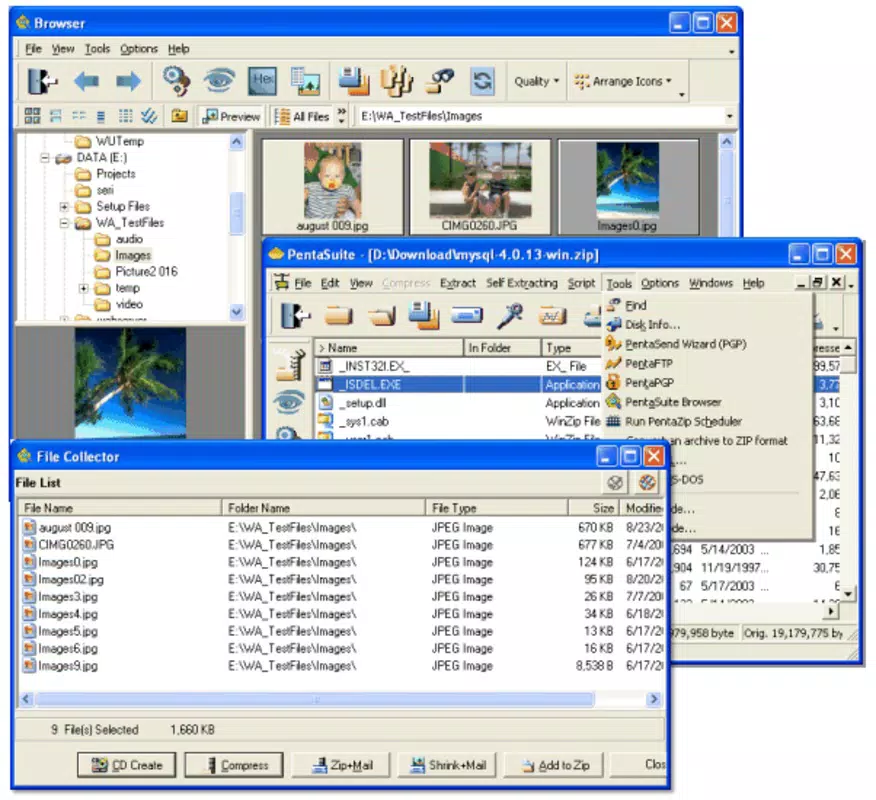
The user interface of PentaZip is designed with practicality in mind, offering a clean layout that prioritizes accessibility and functionality. Navigation is structured around core actions such as adding files, extracting archives, and creating new archives, enabling users to perform tasks with minimal steps. The visual style reflects a classic desktop-inspired design, which may feel familiar to users accustomed to traditional file management tools.
Navigation flow is logical, with clearly labeled buttons and menu options that guide users through compression and extraction workflows. The multiple document interface allows users to open several archive files at once, facilitating multitasking and efficient file handling. Although the developer did not list formal performance metrics, the app appears optimized for stability across a range of device categories, ensuring consistent responsiveness during file operations.
Responsiveness is maintained even when handling moderately large archives, and the app demonstrates reliable performance during repeated use. The absence of reported crashes or freezes suggests a stable runtime environment. Users can expect smooth interactions when managing files, although specific device compatibility details were not disclosed. Overall, PentaZip delivers a dependable experience focused on core functionality, with a user-centric design that supports both new and experienced users.
Platform Compatibility & Technical Requirements
PentaZip is available on Android and iOS platforms, making it accessible to a wide range of smartphone users. The app supports the latest versions of both operating systems, ensuring compatibility with current devices and system updates. The file size is approximately 24.5 MB, which is considered lightweight for a utility app with extensive archive support.
Specific requirements were not listed, so users should ensure their device meets standard system prerequisites for mobile applications. The developer did not specify minimum OS versions or hardware specifications. While the app is designed for mobile use, its functionality mirrors that of the desktop version, suggesting a consistent experience across platforms. Users are encouraged to check their device’s compatibility before installation to avoid potential issues.
Pros and Cons
Pros
- Supports a wide variety of archive formats, enhancing compatibility with diverse file types.
- Allows creation of self-extracting files for easy sharing and access.
- Includes preview functionality for common file types without full extraction.
- Offers password protection for secure archive management.
- Multiple Document Interface improves multitasking and workflow efficiency.
Cons
- Specific technical requirements and OS compatibility details were not provided.
- No official information on update frequency or developer support channels.
- Interface may feel outdated to users accustomed to modern mobile design trends.
- Limited visibility into performance benchmarks or optimization for low-end devices.
- Developer did not disclose information about cloud integration or backup features.
FAQ
Is PentaZip safe to download and use on my smartphone?
PentaZip is a legitimate utility app designed for file compression and decompression. It does not contain malware or intrusive permissions. However, users should always download from official sources to ensure authenticity and security.
Can I use PentaZip to extract RAR and ZIP files?
Yes, PentaZip supports a wide range of archive formats, including RAR and ZIP, allowing users to extract files from these compressed containers without additional software.
Does PentaZip allow me to create password-protected archives?
Yes, the app includes data security features that enable users to protect archives with passwords, helping prevent unauthorized access to sensitive files.
Is PentaZip available for both Android and iOS?
Yes, PentaZip is available on both Android and iOS platforms, offering cross-platform access for users across different device ecosystems.
How often is PentaZip updated?
The developer did not specify update frequency. Users are advised to check for updates regularly through their app store to ensure they have the latest version.
Final Thoughts + CTA
PentaZip stands out as a reliable and feature-rich tool for anyone managing compressed files on their mobile device. Its broad format support, secure archive handling, and intuitive interface make it a valuable addition to personal and professional digital workflows. Whether you're sharing large files, organizing backups, or securing sensitive data, PentaZip delivers consistent performance and flexibility.
While the app lacks detailed technical documentation and modern UI polish, its core functionality remains strong and dependable. Users who prioritize file management efficiency and cross-format compatibility will find PentaZip to be a practical and secure solution. For those seeking a lightweight, all-in-one compression utility, this app offers real-world value without unnecessary complexity.
Download PentaZip now to streamline your file handling experience and take full control of your digital archives.


